

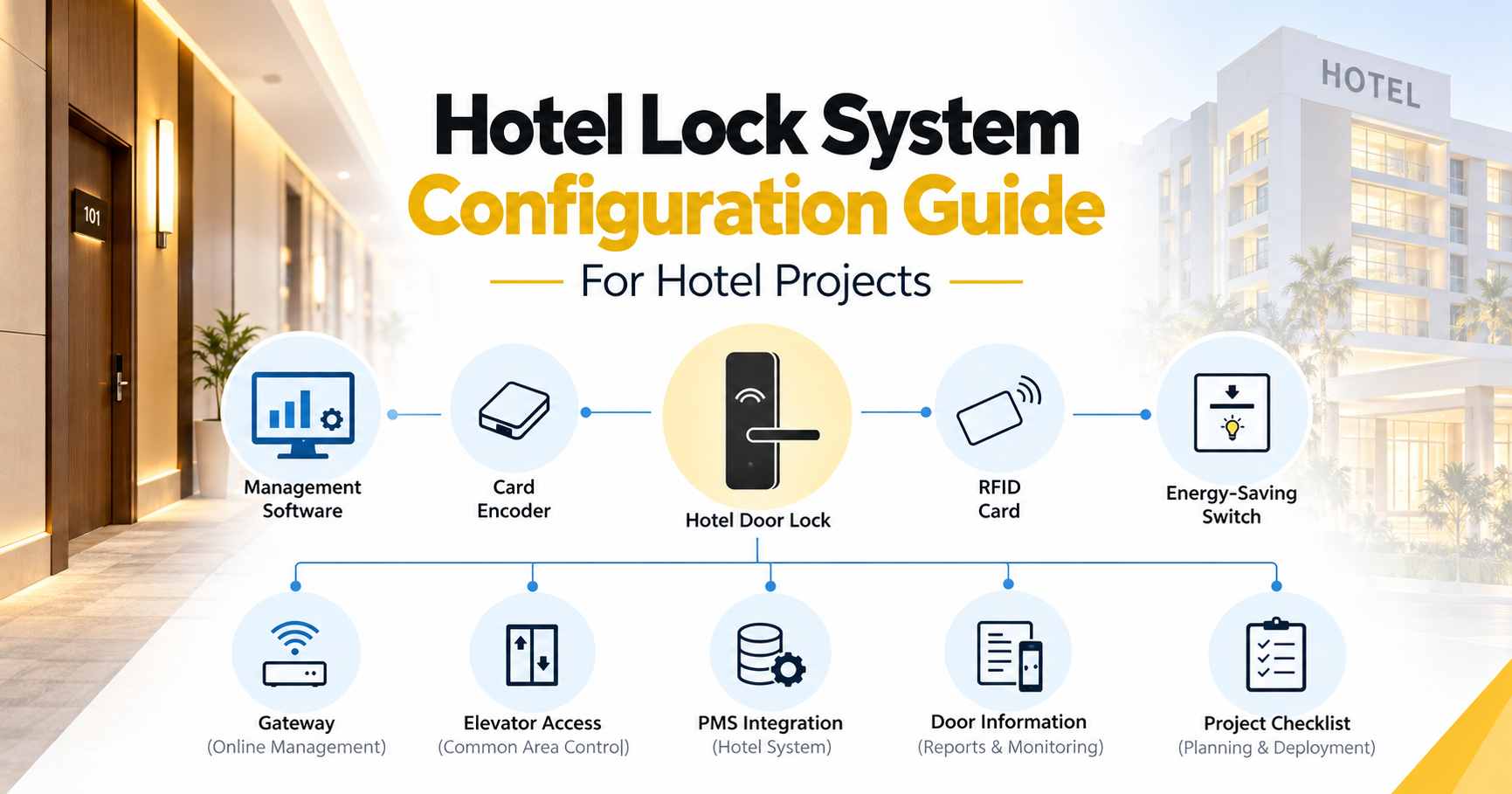
For a new hotel, renovation project, or hotel lock replacement, the correct configuration depends on several factors: the number of rooms, door structure, lock management method, RFID cards, card encoders, energy-saving switches, elevator access, PMS requirements, and installation conditions.
This guide helps hotel owners, contractors, distributors, and project buyers prepare the information needed before requesting a hotel lock system quotation.
If you are not sure about every technical detail, that is fine. Start with your room quantity, project location, and door photos, and the remaining configuration can be confirmed based on your project.
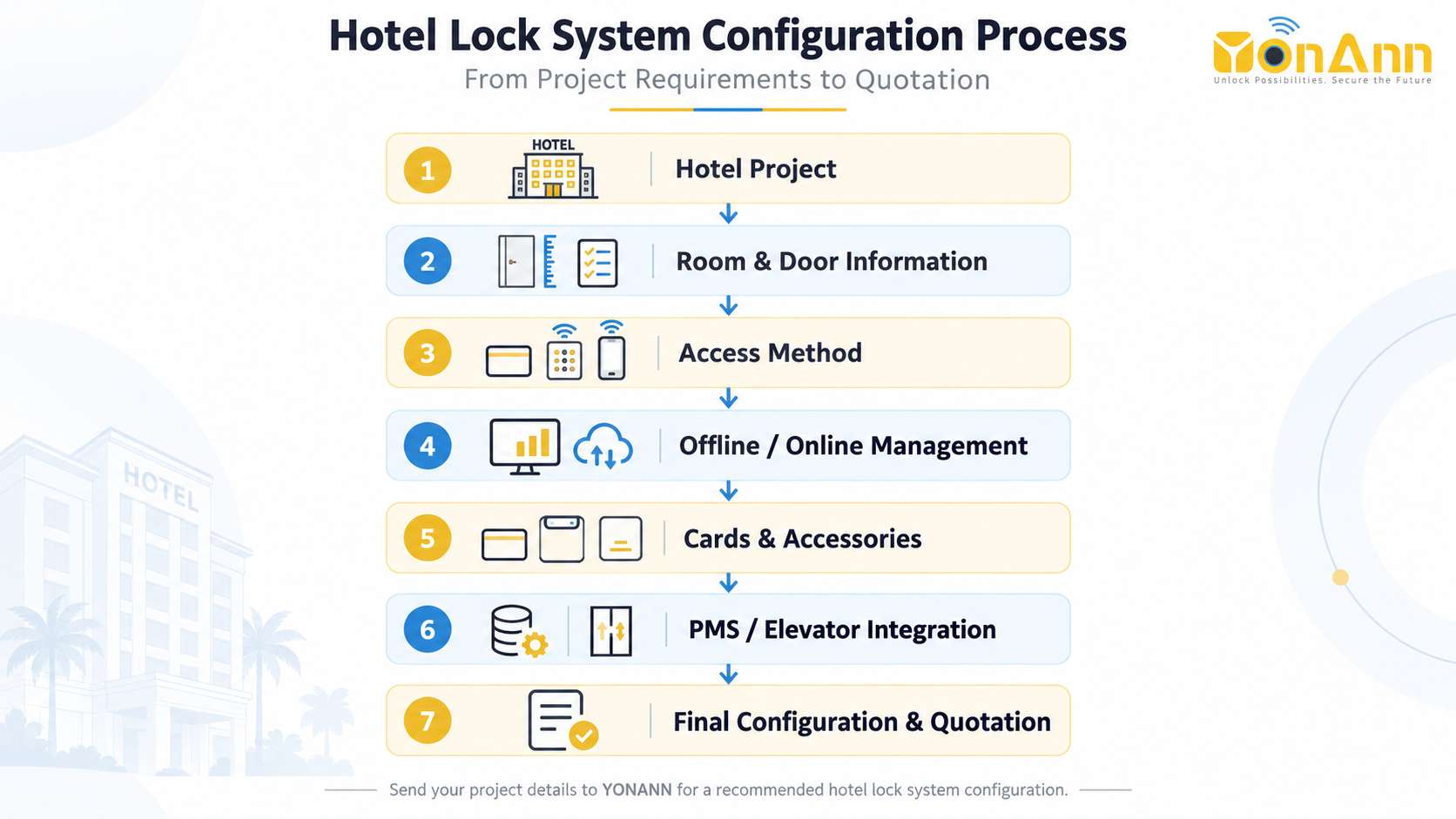
Hotel Lock System Configuration Checklist
Core Equipment
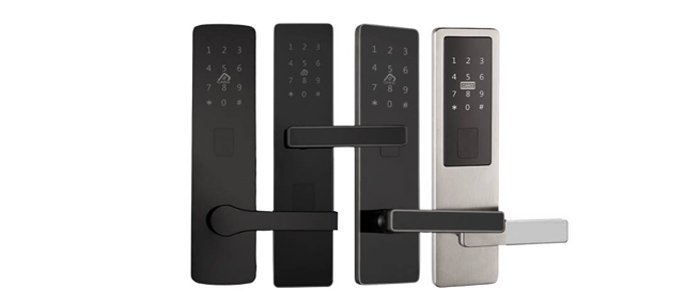
Hotel Door Locks
- RFID Cards / Digital Credentials
- Card Encoder / Management Platform
- Hotel Lock Software
Optional Equipment
Gateway
- Energy-Saving Switch
- Elevator Controller
- Public Door Access
- PMS Integration
Before requesting a quotation, prepare as much of the following information as possible.
| Configuration Item | Information to Confirm |
| Project Type | New hotel / Renovation / Existing lock replacement |
| Property Type | Hotel / Resort / Motel / Serviced apartment |
| Guest Rooms | Number of guest room doors |
| Public Doors | Staff rooms / Offices / Gym / Storage / Other areas |
| Door Material | Wooden / Metal / Composite / Other |
| Door Thickness | ___ mm |
| Existing Lock | Lock photos and dimensions if replacing old locks |
| Mortise | Existing or required mortise dimensions |
| Door Direction | Left / Right / Inward / Outward |
| Access Method | RFID card / Fingerprint / PIN / Mobile app / Mechanical key |
| Management | Offline / Online / Mobile management |
| RFID Cards | Required quantity |
| Card Encoders | Required quantity |
| Energy-Saving Switch | Yes / No |
| Elevator Access | Yes / No |
| PMS Integration | Yes / No |
| Project Location | Country and city |
You do not need to know every item before contacting a supplier. However, providing more project information helps reduce configuration errors and makes the quotation more accurate.
Define Your Hotel Project Type
The first step is to identify whether the project is a new installation or a replacement project.
New Hotel Project
A new hotel usually provides more flexibility when selecting:
- hotel lock design;
- mortise type;
- RFID technology;
- management system;
- door accessories;
- energy-saving switches;
- elevator access control;
- PMS integration.
If the doors have not yet been manufactured, it is better to confirm the hotel lock and mortise specifications before drilling or preparing the doors.
This helps avoid unnecessary modification during installation.
Hotel Renovation or Lock Replacement
Replacing an existing hotel lock requires more information.
Before selecting the new lock, prepare:
- front and back photos of the existing lock;
- lock panel dimensions;
- existing mortise dimensions;
- door thickness;
- existing holes in the door;
- door opening direction.
Whenever possible, selecting a replacement lock that matches the existing mortise and covers the original installation holes can reduce door modification and installation work.
Minimum Information for a Replacement Project
If you do not know the mortise specifications, send:
- A full photo of the existing lock;
- A photo of the door edge;
- Lock panel dimensions;
- Door thickness;
- Photos after removing the old lock, if available.
These details allow the lock supplier to evaluate suitable replacement options.
Confirm the Number of Doors
Do not calculate your hotel lock requirement only by the number of guest rooms.
For example, a 100-room hotel does not always require exactly 100 electronic locks.
You may also need access control for:
- staff rooms;
- management offices;
- storage rooms;
- meeting rooms;
- gyms;
- spas;
- service areas;
- public entrances.
A better project calculation is:
Guest Room Doors + Staff/Public Doors = Total Controlled Doors
Example
A hotel has:
- 100 guest rooms;
- 3 staff rooms;
- 2 storage rooms.
Depending on the required access control, the project may require up to 105 controlled doors, rather than only 100.
Separate guest room doors and public-area doors during planning because they may use different lock or access-control solutions.
Check Door Compatibility
Door compatibility should be confirmed before finalizing the lock model.
Door Material
Common hotel doors include:
- wooden doors;
- metal doors;
- composite doors;
- fire-rated doors.
Different door structures may require different installation methods.
For fire-rated doors in particular, the door certification and local installation requirements should be checked before drilling or modifying the door.
Door Thickness
Door thickness affects:
- spindle length;
- fixing screw length;
- lock installation;
- mortise compatibility.
Typical hotel projects may use different door thickness ranges, so the exact thickness should be confirmed for the selected lock model.
Measure the actual door leaf rather than estimating it from the door frame.
Mortise Type
The mortise is the locking mechanism installed inside the door.
Common hotel lock projects may use mortise specifications such as:
- ANSI mortise;
- Euro mortise;
- 5572;
- 6085;
- 4585;
The correct mortise depends on the lock model, door construction, and existing installation.
For replacement projects, do not select the new hotel lock based only on the appearance of the front panel. The existing mortise and door holes should also be checked.
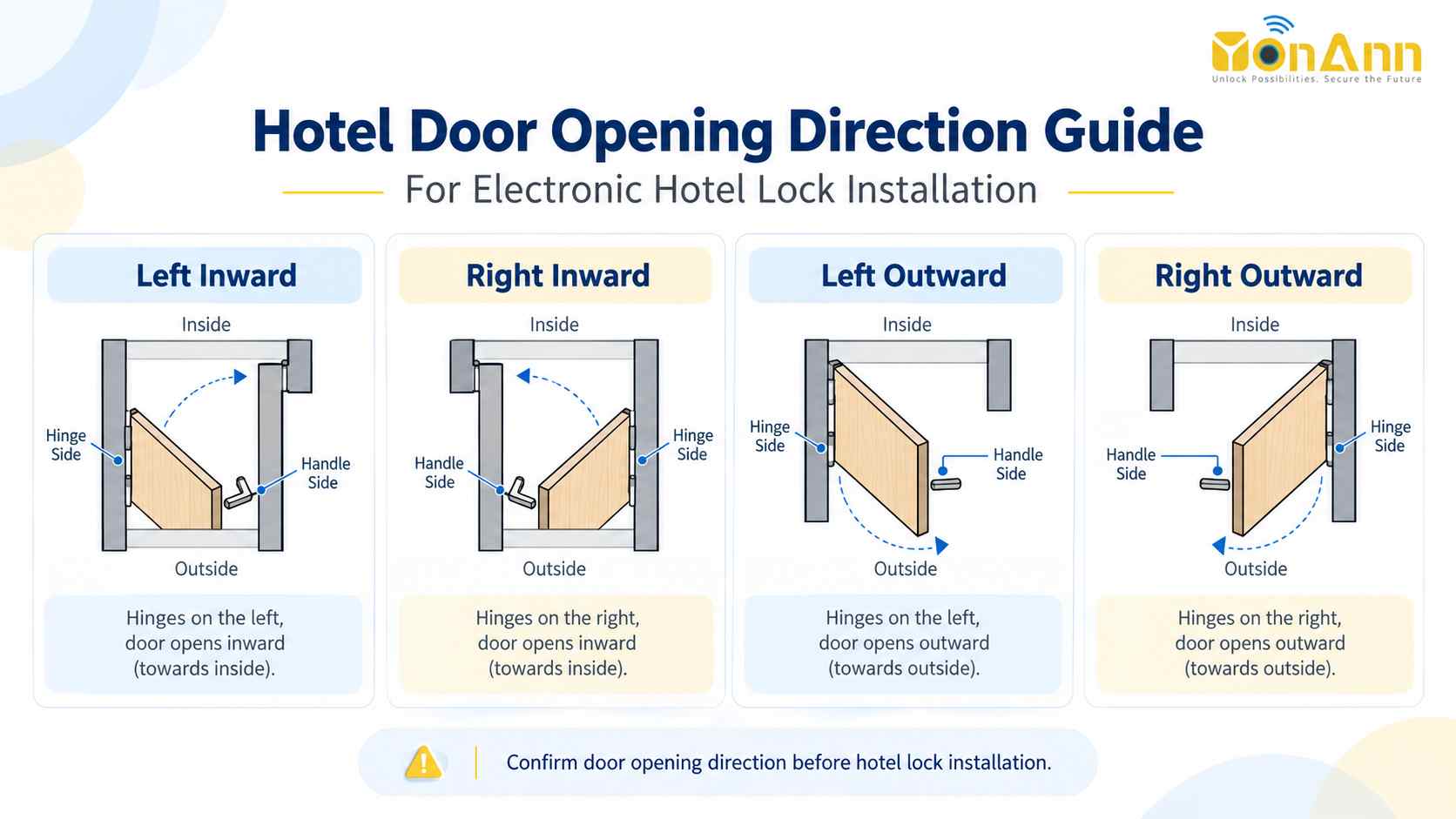
Confirm Door Opening Direction
Door handing is another important installation detail.
Depending on the project, doors may be:
- Left-hand inward;
- Right-hand inward;
- Left-hand outward;
- Right-hand outward.
Some hotel lock handles can be adjusted during installation, while other configurations should be confirmed before shipment.
For a large project, prepare a simple door schedule.
Example Door Schedule
| Door Direction | Quantity |
| Left-hand inward | 30 |
| Right-hand inward | 40 |
| Left-hand outward | 15 |
| Right-hand outward | 15 |
| Total | 100 |
A door direction diagram or site drawing can also help avoid mistakes before mass installation.
Choose the Required Unlock Methods

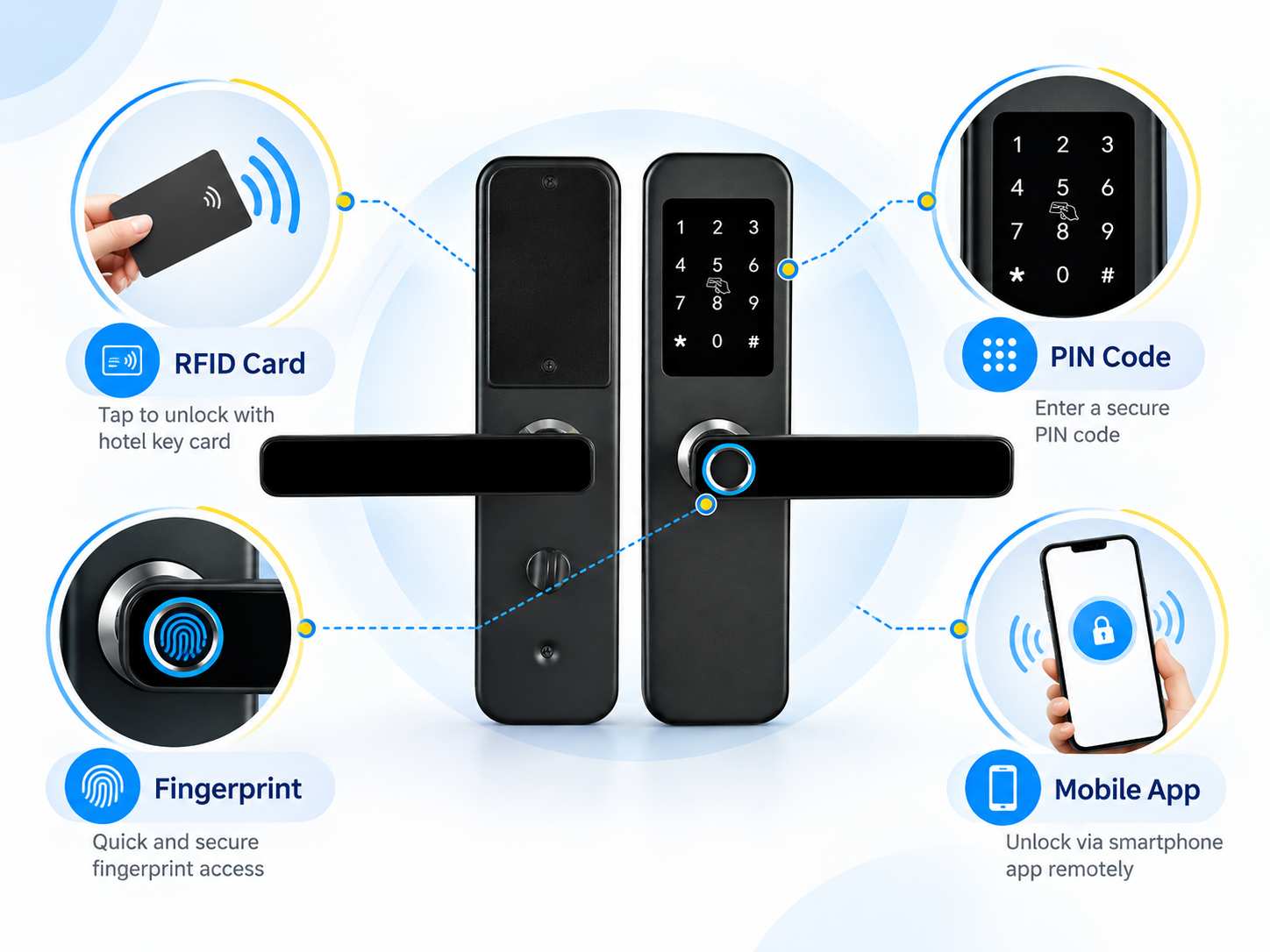
Different hospitality properties require different guest access methods.
The most common options include:
- RFID card;
- fingerprint;
- PIN code;
- Bluetooth mobile key;
- mobile app;
- mechanical emergency key.
The best combination depends on the property type, guest turnover, management model, and required level of convenience.
Option A: RFID Hotel Lock System
A traditional RFID hotel lock system normally includes:
Hotel Management Software → Card Encoder → RFID Card → Hotel Door Lock
This configuration is widely used for:
- hotels;
- resorts;
- ms;
- properties with a traditional front desk.
Guests receive an RFID card during check-in and return or deactivate the card during check-out.
For many conventional hotel projects, this remains a simple and practical configuration.
Option B: RFID + Mobile Access
Hotels that want both traditional front-desk operation and mobile access can consider a system combining RFID cards with mobile management.
Depending on the selected platform, mobile functions may include:
- Bluetooth unlocking;
- mobile keys;
- temporary access;
- access records;
- remote management through a gateway.
The exact functions depend on the selected lock platform and system architecture.
This option can be suitable for hotels that want to keep RFID cards while gradually adding digital access management.
Option C: RFID + PIN + Mobile Access
This configuration adds PIN code access to RFID card and mobile access.
It is suitable for projects that require more flexible self-service access, such as:
- serviced apartments;
- apartment hotels;
- vacation properties;
- long-stay accommodation;
- properties with reduced front-desk operation.
Guests can be given a card, PIN code, or mobile credential depending on the operating model.
PIN codes can also be useful for temporary access or self-check-in scenarios where issuing a physical card is not always necessary.
Option D: Fingerprint + RFID + PIN + Mobile Access
This configuration combines multiple access methods in one hotel or hospitality lock:
- Fingerprint;
- RFID card;
- PIN code;
- Mobile app;
- Mechanical emergency key.
It is suitable for properties that require more flexible access control, such as:
- serviced apartments;
- apartment hotels;
- extended-stay properties;
- vacation rentals;
- staff accommodation;
- VIP rooms;
- properties combining hotel and residential-style operation.
Fingerprint access can be useful for staff, long-term residents, or authorized users who require convenient access without carrying a card.
RFID cards and PIN codes can still be used for guests, while mobile access provides additional flexibility for remote credential management.
For traditional short-stay hotels with frequent guest turnover, fingerprint registration is usually not necessary for every guest. In these projects, fingerprint access is often more suitable for staff, management, long-stay guests, or specific controlled areas.
The final access combination should be selected according to the property’s operating model rather than simply choosing the lock with the most unlocking methods.
Choose Offline or Online Hotel Lock Management
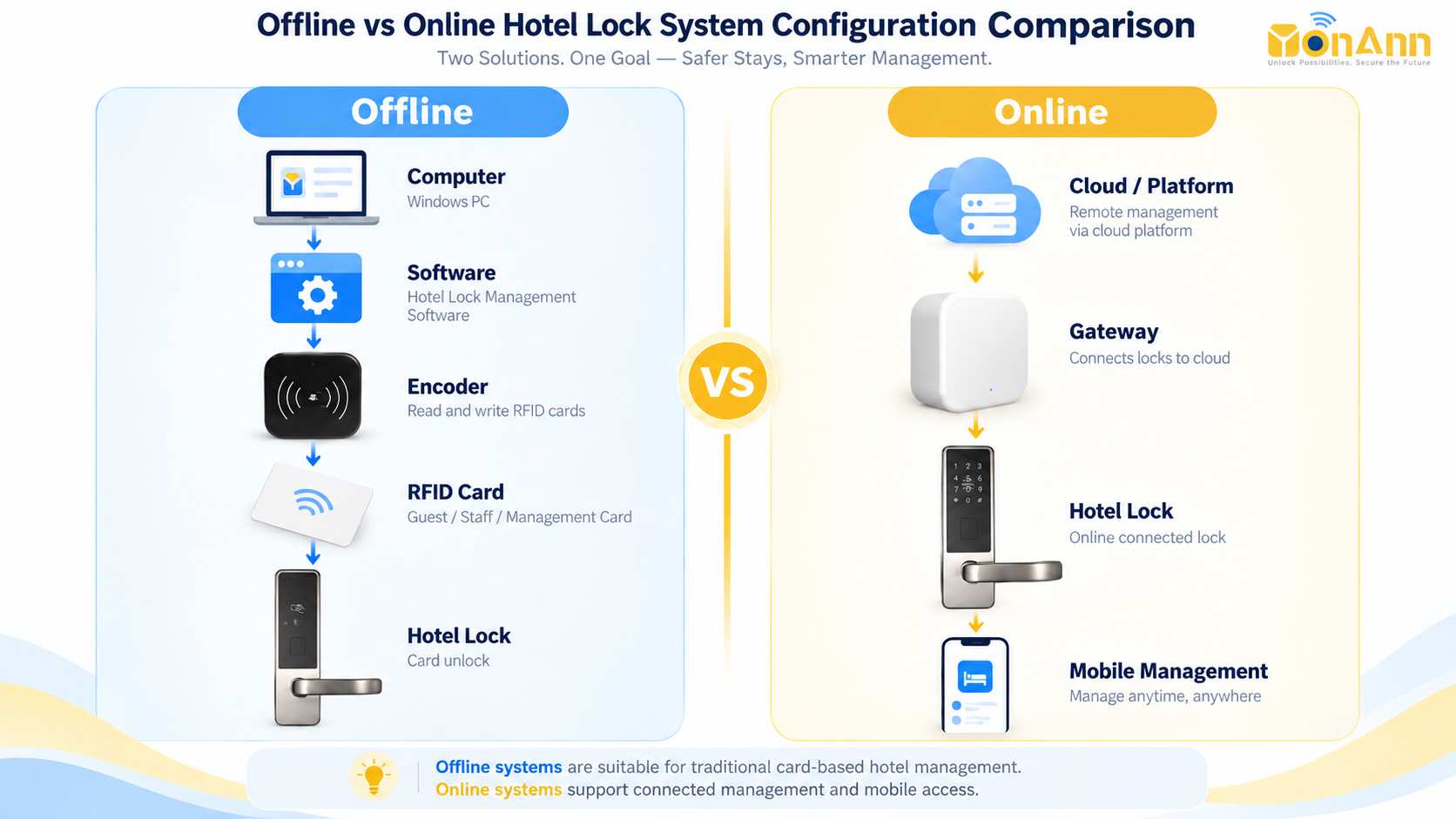
One of the most important project decisions is how the hotel wants to manage its locks.
Offline RFID Hotel Lock System
A typical offline system works as follows:
Front Desk Computer ↓ Hotel Lock Software ↓ Card Encoder ↓ RFID Card ↓ Hotel Room Lock
The lock does not require continuous network communication for normal guest card unlocking.
This type of system is suitable for hotels that want:
- traditional front-desk card management;
- simple infrastructure;
- no network connection at every room door;
- reliable local operation.
Online or Connected Hotel Lock System
An online system may add:
Cloud / Management Platform ↓ Gateway / Network ↓ Hotel Locks
Depending on the platform, online management may provide:
- remote lock management;
- real-time or synchronized access records;
- mobile access;
- remote credential management;
- centralized management of multiple properties.
A gateway may be required for connected management, depending on the selected system.
Offline vs. Online Hotel Lock System
| Function | Offline RFID System | Online / Connected System |
| RFID Card Access | Yes | Yes, depending on system |
| Card Encoder | Usually required | Depends on configuration |
| Network Needed for Normal Card Unlocking | No | Usually not for local credentials |
| Remote Management | Limited | Available |
| Gateway | No | Usually required |
| Mobile Access | Usually no | Available on selected systems |
| Typical Application | Traditional hotels | Smart hotels / resorts / managed properties |
The best option depends on how the hotel operates rather than simply choosing the system with the most functions.
Estimate the Number of RFID Key Cards
A common purchasing mistake is ordering the same number of cards as hotel rooms.
For example:
100 rooms ≠ only 100 RFID cards
Hotels normally require additional cards for:
- simultaneous guests;
- spare cards;
- replacement cards;
- staff;
- housekeeping;
- master access;
- lost or damaged cards.
Example
For a 100-room hotel, an initial order may include approximately:
200–300 RFID cards
The exact quantity depends on:
- average occupancy;
- number of guests per room;
- card replacement rate;
- hotel operating policy;
- staff card requirements.
Custom hotel key cards can also be prepared with hotel branding when required.
Determine the Number of Card Encoders
The card encoder is normally installed at the front desk and is used to issue or program hotel key cards.
A small hotel with one reception desk may only need:
1 card encoder
A larger hotel may use:
2 or more encoders
Consider:
- number of reception desks;
- number of front-desk computers;
- check-in volume;
- backup requirements.
For larger properties, having a backup encoder can help reduce disruption if the primary front-desk device becomes unavailable.
Decide Whether You Need Energy-Saving Switches
An energy-saving switch is installed inside the guest room and can be used to control room electricity.
A typical setup is:
Guest RFID Card ↓ Energy-Saving Switch ↓ Room Power
When planning the system, confirm whether the hotel requires an energy-saving switch for every guest room.
For example:
100 guest rooms → up to 100 energy-saving switches
However, the actual quantity depends on the hotel’s electrical design and room-control system.
The card technology used by the energy-saving switch should also be checked for compatibility with the hotel access system.
Decide Whether You Need Elevator Access Control
Hotels may also use guest credentials to control elevator floor access.
A typical application is:
Guest Room 805 ↓ Hotel Key Card ↓ Elevator Reader ↓ Access to Authorized Floor
Before configuring elevator control, confirm:
- number of elevators;
- number of hotel floors;
- elevator controller requirements;
- guest access rules;
- whether staff require multi-floor access.
Elevator integration should be planned with the elevator or access-control contractor before installation.
Confirm PMS Integration Requirements
If the hotel wants the door lock system to work with a Property Management System (PMS), integration requirements should be confirmed before placing the order.
Prepare the following information:
- PMS brand;
- PMS version;
- required check-in/check-out workflow;
- required interface;
- API or SDK requirements;
- current front-desk system architecture.
Do not assume that every hotel lock system can automatically integrate with every PMS.
Compatibility should be evaluated based on the actual PMS and required interface.
For projects requiring PMS integration, confirm this requirement at the beginning of the project rather than after the locks have been installed.
Plan Front Desk Computers and Hotel Lock Software
A hotel key card system is not only the physical lock.
A typical front-desk configuration may include:
Hotel Management Software + Reception Computer + Card Encoder + RFID Cards + Hotel Door Locks
Before ordering, confirm:
- how many reception desks the hotel has;
- how many computers will operate the lock system;
- whether the system will be installed locally or use connected management;
- How many staff members need access to the software.
For larger projects, the front-desk workflow should be tested before full deployment.
Confirm Installation Responsibility
Before shipment, determine who will install and commission the hotel lock system.
Installation may be handled by:
- the hotel maintenance team;
- a local locksmith;
- the door contractor;
- a security integrator;
- a local distributor.
Before installation, the project team should have access to:
- installation drawings;
- drilling templates;
- mortise dimensions;
- wiring information where required;
- software setup instructions;
- door direction information.
For replacement projects, test one or several sample locks on the existing doors before starting large-scale replacement.
This can identify compatibility problems before the full order is installed.
Hotel Lock System Configuration Examples
The following examples illustrate how a project can be planned. Actual quantities should be adjusted according to hotel operation and site requirements.
Example 1: 20-Room Boutique Hotel
A possible configuration:
| Component | Example Quantity |
| Hotel Door Locks | 20 |
| RFID Cards | 50–60 |
| Card Encoder | 1 |
| Hotel Lock Management Software | 1 system |
| Energy-Saving Switches | 20, if required |
| Elevator Control | Optional |
| Gateway | Optional |
Suitable for:
- boutique hotels;
- guesthouses;
- small resorts.
Example 2: 50-Room Hotel
A possible configuration:
| Component | Example Quantity |
| Hotel Door Locks | 50 |
| RFID Cards | 100–150 |
| Card Encoders | 1–2 |
| Hotel Lock Management Software | 1 system |
| Energy-Saving Switches | Up to 50 |
| Elevator Control | Optional |
| Gateway | According to system |
For a hotel with multiple reception desks, a second encoder may be useful for daily operation or backup.
Example 3: 100-Room Hotel
A possible configuration:
| Component | Example Quantity |
| Hotel Door Locks | 100 |
| RFID Cards | 200–300 |
| Card Encoders | 2 |
| Hotel Lock Management Software | 1 system |
| Energy-Saving Switches | Up to 100 |
| Elevator Control | According to project |
| Gateway | According to coverage and system |
| Public Door Access | According to project |
This configuration should be further adjusted according to public doors, staff access, elevator requirements, online management, and PMS integration.
Hotel Lock System BOM Example
A hotel lock system Bill of Materials (BOM) can help the purchasing team confirm what should be included in the quotation.
| Component | Typical Requirement | Function |
| Hotel Door Lock | Required | Controls guest room access |
| RFID Key Cards | Required for RFID system | Guest and staff credentials |
| Card Encoder | Required for most offline RFID systems | Issues hotel cards |
| Management Software | Required for managed system | Manages rooms, cards and users |
| Energy-Saving Switch | Optional | Controls guest room electricity |
| Elevator Controller | Optional | Controls authorized floors |
| Gateway | Online systems | Provides connected management |
| Public Door Reader | Optional | Controls shared/public areas |
An accurate BOM helps prevent missing accessories during purchasing and installation.
Hotel Lock System Configuration Form
You do not need an interactive online form to prepare your project.
Copy the checklist below, complete the information you already know, and send it with your inquiry.
Project Information
Hotel / Project Name: Country / City: Property Type: Hotel / Resort / Motel / Serviced Apartment / Other Project Type: New Project / Renovation / Existing Lock Replacement Number of Guest Rooms: Number of Public / Staff Doors:
Door Information
Door Material: Door Thickness: Existing Lock Model: Existing Mortise: Door Opening Direction: Door Photos Available: Yes / No
Lock Requirements
Required Unlock Methods: □ RFID Card □ Fingerprint □ PIN Code □ Mobile App □ Bluetooth □ Mechanical Key
Preferred Lock Style: Preferred Finish / Color:
Management Requirements
Management Type: □ Offline RFID System □ Online Management □ Mobile Management □ Not Sure
PMS Integration Required: Yes / No / Not Sure PMS Name:
Accessories
RFID Card Quantity: Card Encoder Quantity: Energy-Saving Switch: Yes / No Elevator Access Control: Yes / No Public Door Access: Yes / No Gateway / Online Management: Yes / No / Not Sure
Additional Requirements
Project Schedule: Other Requirements:
Don’t Know All the Specifications?
You do not need to complete every item before requesting a recommendation.
For an initial hotel lock system evaluation, send us these four basic details:
Number of Hotel Rooms
Tell us approximately how many guest room locks are required.
Project Country and City
The project location helps us understand the project and shipping requirements.
Door Photos
For replacement projects, send photos of:
- the existing lock;
- the front and back of the door;
- the door edge and mortise.
New Project or Replacement Project
Let us know whether the doors are new or whether existing locks will be replaced.
Based on this information, we can first recommend a suitable system. Door measurements, accessories, management requirements, and other details can then be confirmed step by step.
What Information Is Needed for an Accurate Hotel Lock Quotation?
For a more accurate quotation, prepare:
- Number of guest rooms;
- Number of public or staff doors;
- Door material;
- Door thickness;
- Existing lock and mortise dimensions for replacement projects;
- Preferred access method;
- Offline or online management requirement;
- Approximate RFID card quantity;
- Energy-saving switch requirement;
- Elevator access requirement;
- PMS integration requirement;
- Project destination.
Providing door photos is strongly recommended for renovation and lock replacement projects.
Frequently Asked Questions
What information do I need to configure a hotel lock system?
Start with the number of rooms, door type, door thickness, project type, preferred access method, management method, and project location.
For a replacement project, existing lock and mortise photos are also important.
Additional accessories such as key cards, encoders, energy-saving switches, elevator control, gateways, and PMS integration can then be confirmed.
What equipment is normally included in a hotel door lock system?
A typical RFID hotel lock system includes:
- hotel door locks;
- RFID key cards;
- card encoder;
- hotel lock management software.
Depending on the project, it may also include:
- energy-saving switches;
- gateways;
- elevator access control;
- public door access;
- room display or doorbell systems.
How many RFID cards should a hotel order?
Hotels usually order more cards than the number of rooms because cards are also required for additional guests, replacement, staff, housekeeping, and backup.
For example, a 100-room hotel may initially consider approximately 200–300 RFID cards, depending on its operating policy.
How many card encoders does a hotel need?
A small hotel with one reception desk may use one encoder.
Larger hotels, hotels with multiple reception desks, or properties that require a backup device may use two or more.
Does every hotel room need an energy-saving switch?
No.
An energy-saving switch is optional and depends on the hotel’s electrical design and energy-management requirements.
Can I replace my existing hotel locks without changing the doors?
In many projects, this is possible, but compatibility must be checked first.
The existing mortise, lock panel dimensions, installation holes, door thickness, and door structure should be evaluated before selecting the replacement lock.
Sending photos and measurements of the existing lock helps identify suitable options.
Does a hotel lock system require internet access?
A traditional offline RFID hotel lock system does not require an internet connection at every room door for normal card access.
Connected systems may use gateways or network infrastructure for remote management, synchronization, mobile access, or online records.
Can a hotel door lock system integrate with PMS software?
PMS integration may be possible, but compatibility depends on the PMS brand, version, interface, and required workflow.
Provide your PMS information before finalizing the hotel lock system so the integration requirements can be evaluated.
Get a Hotel Lock System Configuration for Your Project
Every hotel project has different doors, room quantities, management requirements, and operating workflows.
Instead of selecting a hotel lock only by appearance or price, first confirm the complete project configuration.
Send YONANN:
- your hotel room quantity;
- project country;
- new or replacement project;
- door photos;
- preferred access method;
- any PMS, elevator, or mobile-management requirements.
Our team can help determine the appropriate hotel locks, cards, encoders, software, and optional accessories for your project.
Request Your Hotel Lock System Configuration & Quotation
 English
  Russian
  Spanish
  Arabic
  Vietnamese