

В чём принцип работы «умного» замка?
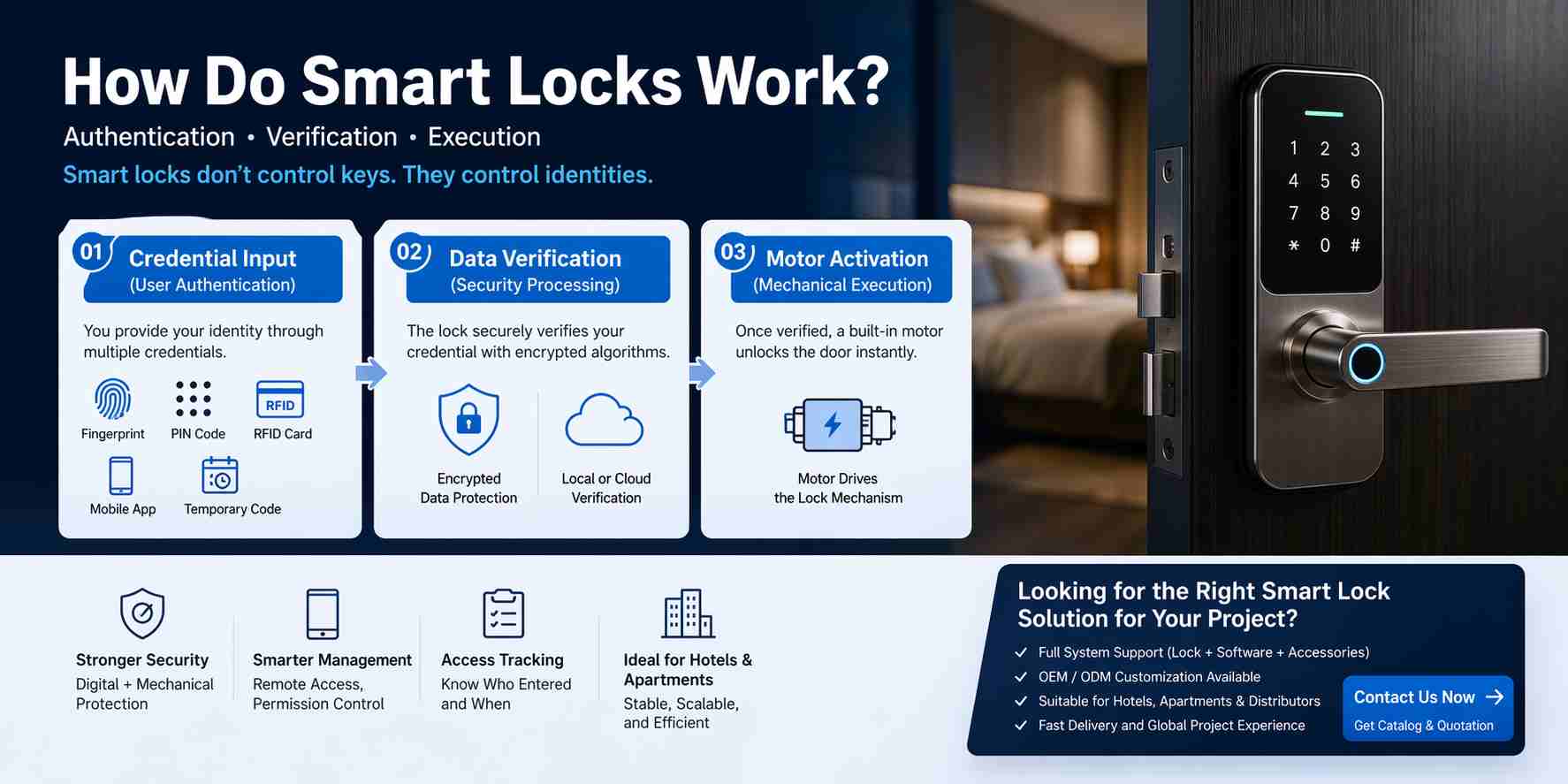
«Умный» замок работает путем проверки личности пользователя с помощью цифровых учетных данных, после чего запускается электронный механизм для разблокировки двери.
В отличие от традиционных замков, которые полагаются на физические ключи и механическую юстировку, «умный» замок работает посредством структурированного процесса, который сочетает в себе аутентификация, проверка и выполнение. Эта система преобразует контроль доступа из простого физического действия в безопасный процесс принятия решений на основе идентификации личности.
В основе принципа работы умного замка лежит следующее:
👉 Аутентификация → Проверка → Выполнение
Сначала пользователь предоставляет идентификационный документ, такой как отпечаток пальца, PIN-код, RFID-карта или авторизация через мобильное приложение. Этот этап называется аутентификацией, в ходе которой система собирает учетные данные пользователя.
Далее блокировка обрабатывает и проверяет эти данные. Учетные данные сравниваются с сохраненными или авторизованными записями с использованием алгоритмов шифрования. Этот этап проверки определяет, следует ли предоставить или отказать в доступе. В более сложных системах, особенно в отелях или коммерческих учреждениях, этот процесс может включать централизованную систему или программную платформу.
Наконец, после успешной проверки личности, замок совершает механическое действие. Встроенный двигатель активирует внутренний запирающий механизм, такой как защелка или врезной замок, физически отпирая дверь.
Этот трехэтапный процесс наглядно демонстрирует принципиальное различие между «умными» замками и традиционными замками:
- Традиционный контроль замков ключи
- Управление «умными» замками идентичности
Этот сдвиг имеет решающее значение в современном управлении доступом. Вместо того чтобы полагаться на то, кто владеет ключом, «умные» замки гарантируют, что доступ могут получить только авторизованные пользователи — на основе определенных прав доступа. Это позволяет реализовать расширенные функции, такие как ограниченный по времени доступ, удаленная авторизация и отслеживание доступа.
По сути, умный замок — это не просто запирающее устройство, а... миниатюра система контроля доступа встроен в дверь, Разработан для обеспечения как безопасности, так и гибкости в современных условиях.
Понимание принципа работы «умных» замков имеет важное значение при выборе системы «умных» замков для отелей, квартир или коммерческих объектов.
Основной принцип работы «умного» замка
«Умный» замок работает по структурированному трехэтапному процессу: ввод учетных данных, проверка данных и механическое исполнение. Каждый этап играет решающую роль в обеспечении как безопасности, так и надежности.
Шаг 1 – Ввод учетных данных (аутентификация пользователя)
Первый шаг в работе умного замка — это ввод учетных данных, когда пользователь предоставляет идентификационные данные для запроса доступа.
Идентификация может принимать различные формы, в том числе:
- Отпечаток пальца (биометрические данные)
- ПИН-код (ввод числовой цифры)
- RFID-карта (радиочастотный идентификационный номер)
- Мобильное приложение (зашифрованный цифровой ключ)
- Временный код доступа (авторизация на ограниченный срок)
На данном этапе «умный» замок не отпирает дверь — он просто собирает данные. учетные данные.
Обработка различных учетных данных осуществляется по-разному. Например, отпечаток пальца преобразуется в цифровой шаблон, в то время как RFID-карта передает уникальный идентификатор или зашифрованные данные сектора. Доступ через мобильное приложение обычно генерирует защищенный токен, который взаимодействует с замком через Bluetooth или Wi-Fi.
👉 Главное: “Умный” замок не распознает «пользователей» напрямую — он распознает учетные данные.
Шаг 2 – Проверка данных (обработка для обеспечения безопасности)
Второй этап — проверка данных, на котором интеллектуальный замок определяет, являются ли предоставленные учетные данные действительными.
Это наиболее важный этап во всей системе, поскольку он определяет уровень безопасности замка.
После получения учетных данных внутренний процессор замка сравнивает их с сохраненными авторизованными данными. Этот процесс обычно защищен с помощью алгоритмов шифрования, таких как AES (Advanced Encryption Standard), что гарантирует невозможность легкого перехвата или копирования учетных данных.
Существует два основных метода проверки:
- Локальная проверкаУчетные данные хранятся непосредственно внутри замка (это распространенная практика в гостиничных RFID-замках и автономных системах).
- Проверка системы/облакаУчетные данные проверяются через приложение или централизованную платформу (что часто встречается в системах «умного дома» и «интернета вещей»).
Если учетные данные совпадают с авторизованными данными, система разрешает доступ. В противном случае дверь остается заблокированной.
👉 Именно здесь обеспечивается настоящая безопасность.
Надежность «умного» замка во многом зависит от того, насколько безопасно и точно реализован этот этап.
Шаг 3 – Моторная активация (механическое выполнение)
Заключительный этап — механическое исполнение, когда «умный» замок физически отпирает дверь.
После успешной проверки замок посылает сигнал встроенному электродвигателю. Этот двигатель приводит в действие внутренний запирающий механизм, например, защелку или врезной замок, для разблокировки двери.
Этот процесс обычно включает в себя:
- Вращение двигателя
- Коробка передач
- Выдвижение защелки или ригельного замка
Вся эта операция обычно занимает менее одной секунды.
В отличие от традиционных замков, где механизм поворачивается вручную ключом, «умный» замок использует управляемые электронные сигналы для выполнения той же функции.
👉 Надежность этого этапа зависит от качества оборудования.
Низкокачественные «умные» замки часто выходят из строя не в программном обеспечении, а в двигателе или механической системе передачи после многократного использования.
«Умный» замок работает путем сбора учетных данных пользователя, их безопасной проверки, а затем запуска моторизованного механизма для разблокировки двери, что делает его системой контроля доступа на основе идентификации, а не устройством запирания с помощью ключа.
Основные компоненты, обеспечивающие работу «умных» замков.
«Умный» замок — это не просто отдельное устройство, а комбинация механических, электронных и коммуникационных систем, работающих вместе для обеспечения безопасного и надежного контроля доступа.
Понимание этих ключевых компонентов помогает покупателям оценивать качество продукции, стабильность системы и ее долгосрочную производительность.
Корпус механического замка (основа безопасности)
Корпус механического замка является основной физической конструкцией «умного» замка и остается наиболее важным фактором, определяющим его устойчивость к взлому.
Несмотря на использование цифровых технологий в умных замках, их физическая безопасность по-прежнему зависит от традиционной механической прочности.
К распространенным типам корпусов замков относятся:
- Врезные замки (используется в гостиницах и коммерческих зданиях)
- Замки с засовами (часто используется в жилых помещениях)
- Евро профильные цилиндры (широко используется на европейских рынках)
Среди них врезные замки обеспечивают самый высокий уровень безопасности благодаря своей цельной конструкции и более прочным внутренним компонентам.
Высококачественный корпус замка обычно включает в себя:
- Защитные пластины от сверления
- Усиленная защелка и замок
- Прочная внутренняя конструкция трансмиссии
👉 В реальных условиях большинство сбоев в системе безопасности происходит из-за слабых механических конструкций, а не из-за цифровых уязвимостей.
Электронный блок управления (мозг замка)
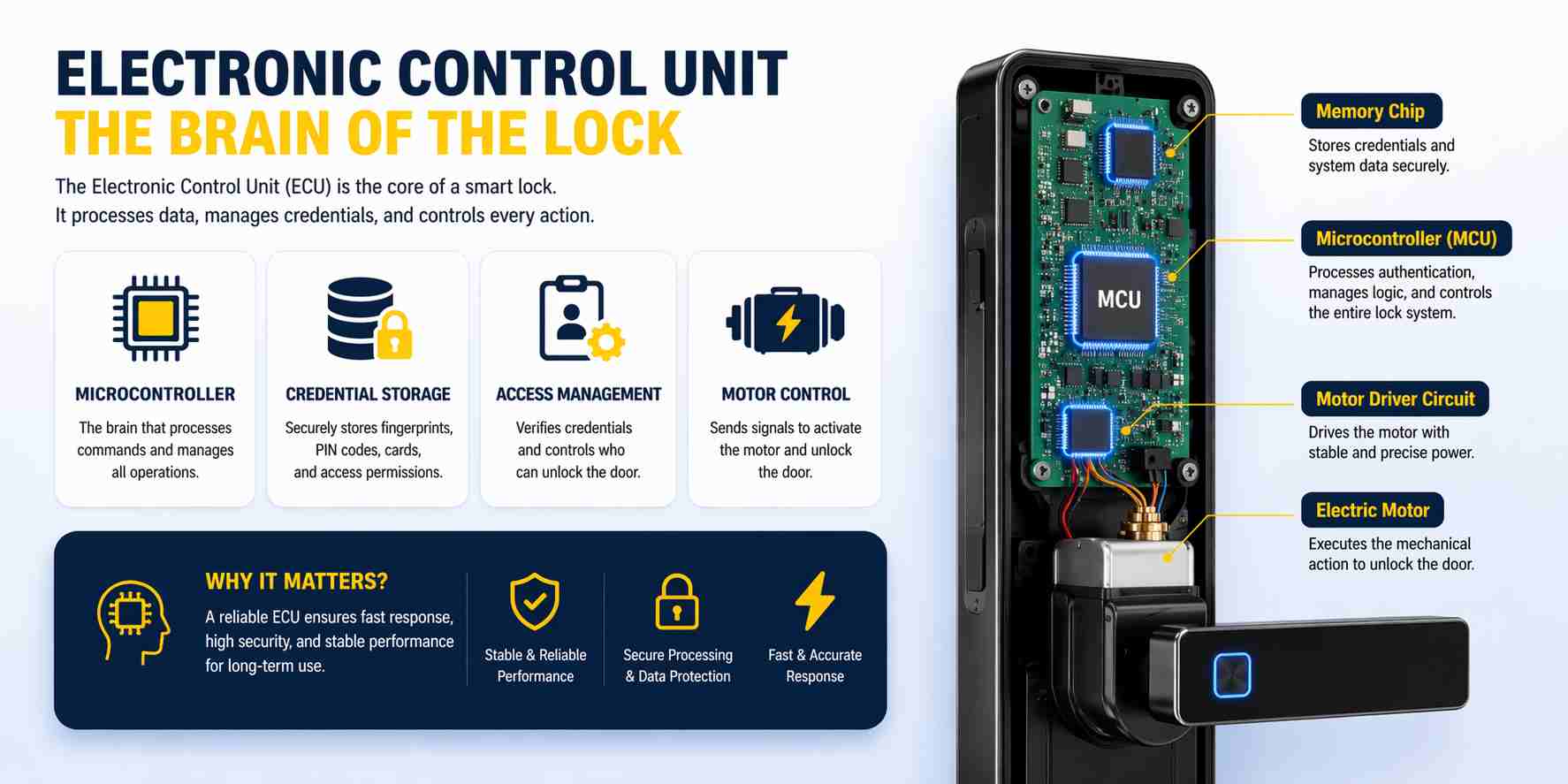
Электронный блок управления (ЭБУ) отвечает за обработку всех цифровых операций в интеллектуальном замке.
Это включает в себя:
- Хранение учетных данных пользователя
- Управление правами доступа
- Обработка запросов на аутентификацию
- Управление активацией двигателя
В центре блока управления двигателем (ЭБУ) находится микроконтроллер (МКУ), который выступает в роли “мозга” системы.
В высококачественных умных замках система управления спроектирована следующим образом:
- Стабильность при длительном использовании
- Устойчивость к электрическим помехам
- Способен обрабатывать множество пользователей и учетных данных.
👉 Надежный блок управления (ЭБУ) гарантирует быструю и точную реакцию замка при каждой попытке пользователя открыть дверь.
Коммуникационный модуль (как замок подключается)
Модуль связи определяет, как интеллектуальный замок взаимодействует с пользователями и внешними системами.
В зависимости от области применения используются разные технологии:
- Bluetooth – для локального управления через смартфон
- Wi-Fi – для удалённого доступа и подключения к облаку
- RFID – для карточных систем (особенно в отелях)
- Зигби / Thread – для интеграции в систему «умный дом»
- Модули, совместимые с материей – для кроссплатформенных экосистем
Каждый метод коммуникации имеет свои преимущества.
Например:
- Bluetooth работает стабильно и не требует подключения к интернету.
- Wi-Fi позволяет осуществлять дистанционное управление, но зависит от стабильности сети.
- Технология RFID обеспечивает высокую скорость и надежность при крупномасштабном внедрении.
👉 Выбор коммуникационного модуля напрямую влияет на производительность системы, особенно в коммерческих проектах.
Энергетическая система (обеспечивающая непрерывную работу)
Для надежной работы умных замков в течение длительного времени необходима стабильная система электропитания.
Большинство замков питаются от:
- Батарейки АА
- Перезаряжаемые литиевые батареи
Срок службы батареи обычно составляет от 6 до 12 месяцев, в зависимости от частоты использования и конструкции системы.
Для предотвращения ситуаций блокировки доступа умные замки включают в себя несколько резервных механизмов:
- Предупреждения о низком заряде батареи (звуковое оповещение или уведомление в приложении)
- Аварийное электропитание через USB-порт
- Механическая блокировка ключа
👉 Хорошо продуманная система электропитания гарантирует, что замок останется работоспособным даже в непредвиденных условиях.
«Умный» замок работает за счет интеграции прочной механической конструкции, стабильной электронной системы управления и надежного коммуникационного модуля, обеспечивая как физическую безопасность, так и интеллектуальный контроль доступа.
Как разные типы Умные замки Работа
Не все умные замки работают одинаково.
В зависимости от области применения, различные типы «умных» замков используют разные технологии, методы связи и системные архитектуры.
Понимание принципа работы каждого типа помогает пользователям выбрать оптимальное решение для своих конкретных потребностей.
Как Умные замки с RFID-технологией Работа (гостиничные системы)
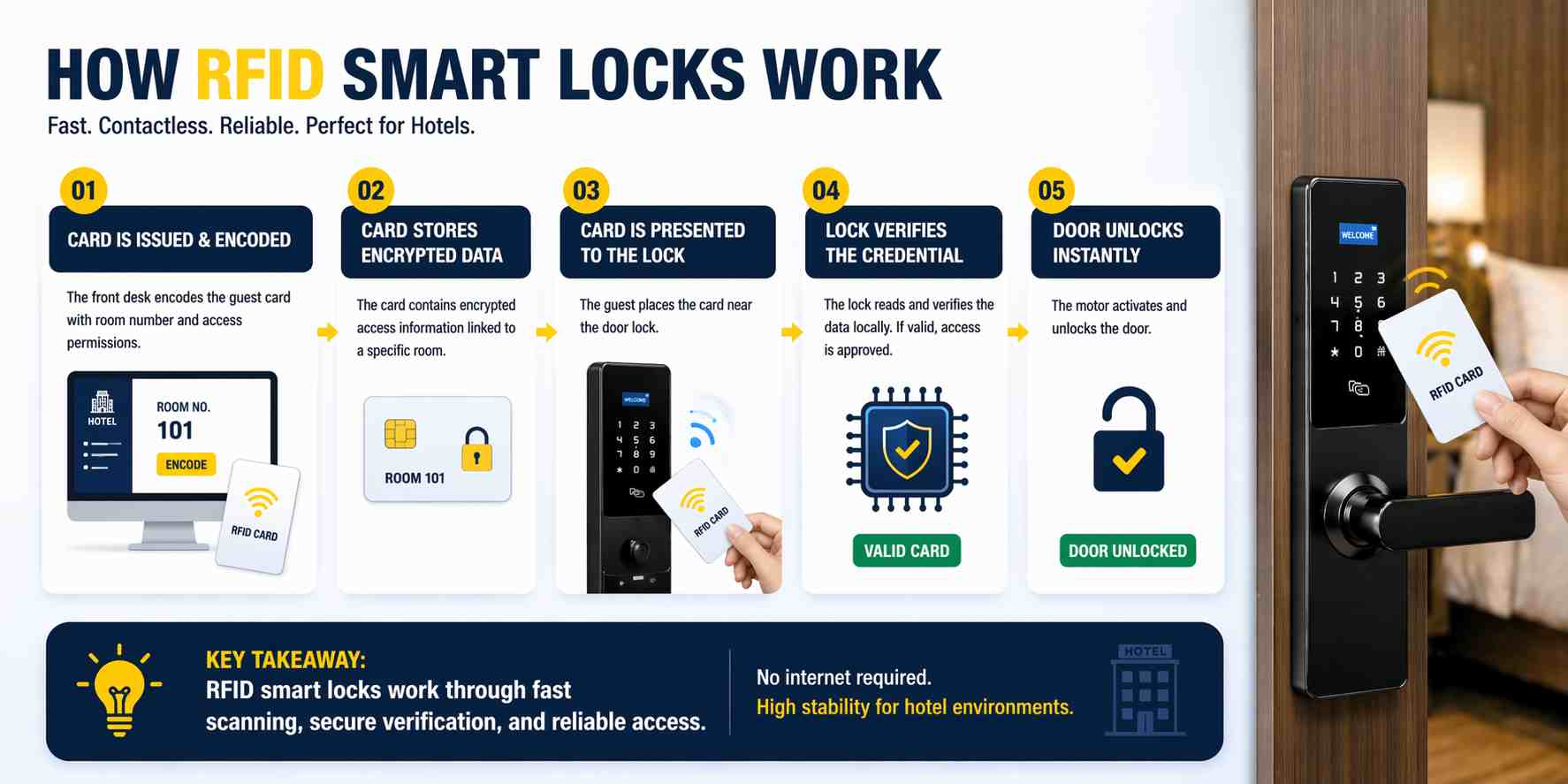 Умные замки RFID работают на основе технологии радиочастотной идентификации, обеспечивая быстрый и бесконтактный доступ.
В типичной RFID-системе этот процесс работает следующим образом:
- Карта выпускается и кодируется с помощью кодировщика карт.
- Карта содержит зашифрованные данные доступа, привязанные к конкретному помещению или разрешению.
- Когда карта подносится к замку, RFID-считыватель сканирует данные.
- Блокировка проверяет учетные данные локально.
- Если дверь исправна, она мгновенно открывается.
В отличие от систем на основе приложений, умные замки с RFID-технологией обычно работают офлайн, Это означает, что им не требуется постоянное подключение к интернету.
Это делает их очень стабильными и надежными, поэтому они широко используются в:
- Отели
- Курорты
- Квартиры с централизованным управлением
👉 Системы RFID предназначены для скорость, масштабируемость и низкий уровень отказов, что делает их идеальными для крупных проектов.
Как Умные замки Bluetooth Работа (системы на основе приложений)
Умные замки с Bluetooth используют беспроводную связь ближнего радиуса действия для прямого подключения к смартфону.
Рабочий процесс обычно включает в себя:
- Пользователь открывает мобильное приложение (например, TTLock).
- Приложение генерирует защищенный, зашифрованный токен.
- Телефон взаимодействует с замком через Bluetooth.
- Блокировка проверяет учетные данные локально.
- Мотор включается и открывает дверь.
Замки с Bluetooth не требуют подключения к интернету для базовой работы, что делает их:
- Легко установить
- Стабильная работа в автономном режиме.
- Подходит для сдачи в аренду.
Они обычно используются в:
- Недвижимость Airbnb
- Квартиры
- Пространства для совместного проживания
👉 Одним из ключевых преимуществ является возможность генерировать временные или временные коды доступа удаленно.
Как Работают умные замки с Wi-Fi. (Системы дистанционного управления)
Умные замки с Wi-Fi подключаются к интернету, позволяя пользователям удаленно контролировать и отслеживать доступ.
Рабочий процесс включает в себя:
- Замок подключается к сети Wi-Fi или шлюзу.
- Пользователь отправляет команду через мобильное приложение.
- Команда передается через облачный сервер.
- Замок получает сигнал и проверяет авторизацию.
- Замок выполняет действие разблокировки.
Эта архитектура позволяет:
- Дистанционная разблокировка
- Мониторинг в режиме реального времени
- Журналы доступа и уведомления
Однако работа Wi-Fi-блокировок также зависит от:
- Стабильность сети
- управление энергопотреблением
👉 Они лучше всего подходят для пользователей, которым необходимо дистанционное управление и в реальном времени управление доступом.
Как Умные замки Matter Работа (Стандарт будущей экосистемы)
Умные замки Matter разработаны для работы в различных экосистемах умного дома с использованием единого стандарта связи.
Вместо того чтобы полагаться на единую платформу, Matter позволяет устройствам беспрепятственно взаимодействовать с такими системами, как:
- Apple Home
- Google Домой
- Амазон Алекса
- SmartThings
Принцип работы включает в себя:
- Замок подключается через Thread или Wi-Fi.
- Центр управления связью в системе «умный дом» (пограничный маршрутизатор)
- Пользователь отправляет команды через любую совместимую экосистему.
- Замок получает стандартизированные инструкции и выполняет их.
👉 Главное преимущество материи заключается в совместимость.
Это означает, что пользователи не привязаны к одной платформе, что делает ее перспективным решением для умных домов и сложных проектов.
Работают ли умные замки без интернета?
Да, большинство умных замков могут работать без интернета.
На самом деле, многие профессиональные системы разработаны для работы полностью в автономном режиме.
Например:
- RFID-замки в отелях позволяют локально регистрировать учетные данные.
- Замки с поддержкой Bluetooth взаимодействуют напрямую со смартфонами.
Интернет требуется только в следующих случаях:
- Для разблокировки требуется дистанционное управление.
- Требуется управление на основе облачных технологий.
- Необходим многоместный контроль.
👉 Именно поэтому многие отели и коммерческие проекты отдают предпочтение именно этому методу. автономные или полуавтономные системы для большей стабильности.
Различные «умные» замки используют разные технологии — такие как RFID, Bluetooth, Wi-Fi или Matter — но все они следуют одному и тому же принципу: проверка цифровых учетных данных и запуск безопасного механизма разблокировки.
Безопасны ли умные замки? (Объяснение вопросов безопасности)
Как правило, «умные» замки безопасны при правильном проектировании и установке, поскольку они сочетают в себе цифровое шифрование и физическую защиту для предотвращения доступа.
Однако их безопасность зависит от множества факторов, включая качество оборудования, стандарты шифрования и конструкцию системы, а не только от того, является ли замок “умным” или нет.
Цифровая безопасность: как «умные» замки защищают доступ к данным
В умных замках используются зашифрованные протоколы связи, гарантирующие невозможность легкого перехвата или копирования учетных данных.
Когда пользователь открывает дверь с помощью отпечатка пальца, PIN-кода или мобильного приложения, данные обрабатываются с использованием защищенных алгоритмов шифрования, таких как AES (Advanced Encryption Standard).
Это обеспечивает защиту от:
- Перехват учетных данных
- Атаки повтора
- Несанкционированное копирование
Кроме того, многие системы используют аутентификацию на основе токенов, что означает, что каждый запрос на разблокировку уникален и не может быть использован повторно.
👉 В профессиональных системах конфиденциальные данные никогда не передаются в открытом текстовом виде.
Физическая безопасность: самый важный, но часто упускаемый из виду фактор.
Хотя цифровая безопасность важна, физическая безопасность остается наиболее важным фактором защиты в реальном мире.
«Умный» замок — это всё ещё замок, и его устойчивость к взлому зависит от его механической конструкции.
К высококачественным «умным» замкам относятся:
- Усиленные пазовые конструкции
- Защитные пластины от сверления
- Надежные системы защелок и ригельных замков
Даже замки низкого качества, обладающие расширенными функциями, могут быть уязвимы, если их механические компоненты ненадежны.
👉 В большинстве реальных случаев взломы происходят из-за слабых замков, а не из-за хакерских атак.
Функции безопасности на уровне пользователя
Современные «умные» замки включают в себя дополнительные функции, предназначенные для защиты пользователей в повседневных ситуациях.
К ним могут относиться:
- Пароль для защиты от подглядывания (допускает ввод случайных цифр до/после реального PIN-кода)
- Функция автоматической блокировки (Автоматически блокируется после закрытия двери)
- Журналы доступа (записывает, кто вошел и когда)
- Временные коды доступа (срок действия истекает через установленное время)
Эти функции снижают риски безопасности, связанные с человеческим фактором, такие как раскрытие паролей или забытые блокировки.
Можно ли взломать «умные» замки?
Технически, мишенью может стать любое подключенное электронное устройство, но реальный риск зависит от качества системы.
Грамотно спроектированные «умные» замки минимизируют риски за счет:
- Надежное шифрование
- Безопасные обновления прошивки
- Системы контролируемого доступа
Напротив, плохо спроектированные или недорогие замки могут иметь уязвимости из-за слабого программного обеспечения или устаревших протоколов.
👉 Однако на практике взлом умного замка встречается гораздо реже, чем физические проникновения.
Сравнение рисков в реальных условиях
Для понимания безопасности умных замков важно сравнить их с реальными рисками:
| Тип риска | Вероятность | Общее дело |
| Физическое проникновение | Высокий | Слабая структура замка |
| Потеряли ключ/карту? | Середина | Ошибка пользователя |
| утечка паролей | Середина | Некачественная практика использования |
| Удаленный взлом | Низкий | Продвинутая атака |
👉 Это показывает, что Механическая прочность и правильное использование имеют большее значение, чем теоретические риски взлома..
Безопасны ли умные замки для отелей и апартаментов?
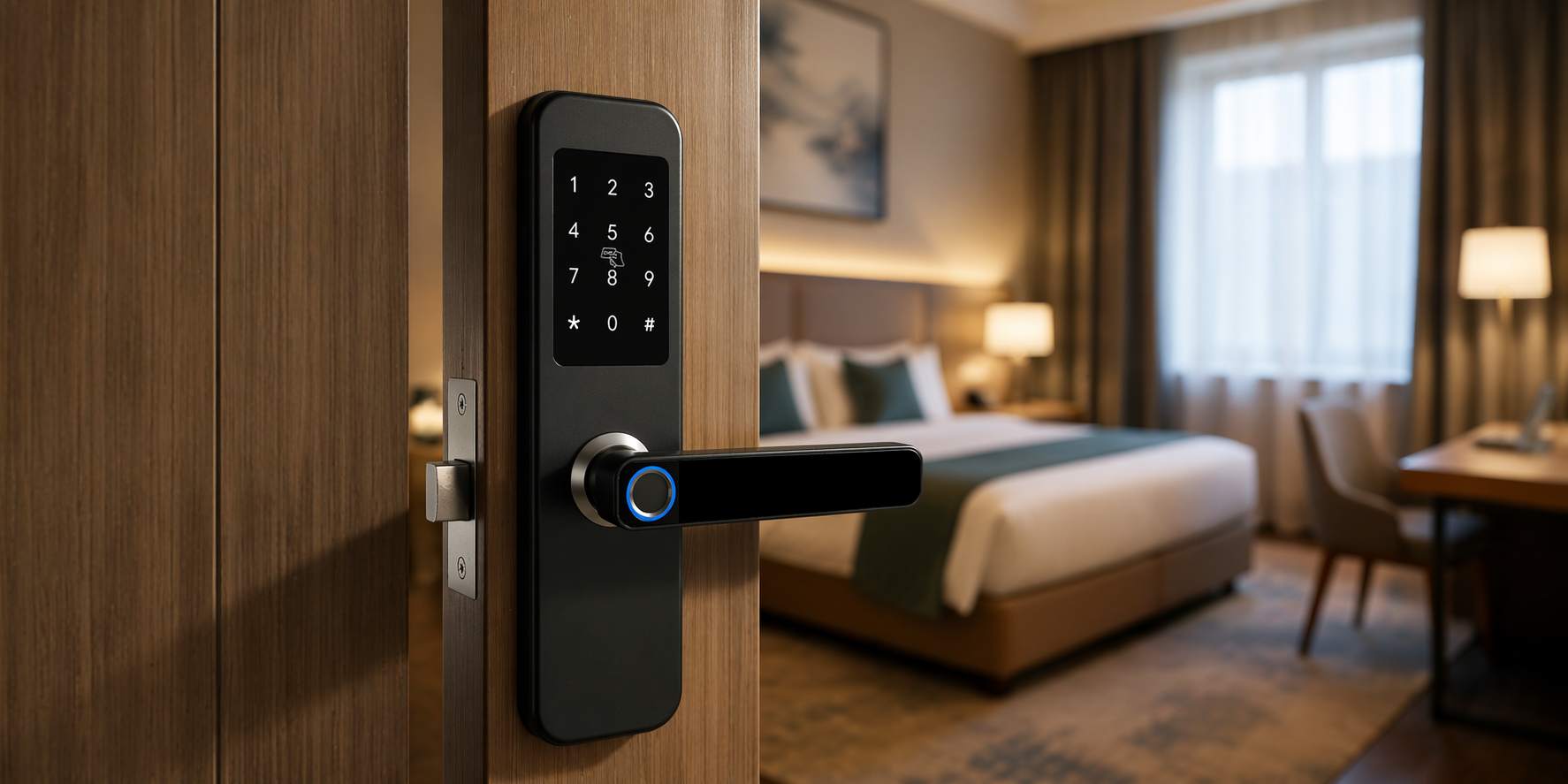
Да, умные замки широко используются в отелях и квартирах, поскольку они повышают как безопасность, так и эффективность управления.
В гостиничной среде системы «умных» замков с RFID-метками предпочтительны по следующим причинам:
- Учетные данные кодируются и контролируются централизованно.
- Карты можно деактивировать мгновенно.
- Отсутствие риска копирования физических ключей.
В квартирах и арендуемых помещениях умные замки обеспечивают:
- Удаленный контроль доступа
- Вход ограничен по времени.
- Нет необходимости передавать ключи.
👉 Эти преимущества делают умные замки настоящими находками. Более надежны, чем традиционные замки, в многопользовательских средах..
«Умные» замки безопасны, когда сочетают в себе надежное шифрование, проверенную конструкцию системы и высококачественную механическую структуру, что делает их более защищенными и гибкими, чем традиционные замки, в большинстве реальных ситуаций.
Распространенные проблемы с умными замками и способы их решения.
Как и любое электронное устройство, умные замки могут испытывать проблемы в процессе ежедневного использования.
Большинство проблем вызвано не самой концепцией «умных» замков, а такими факторами, как установка, условия эксплуатации или качество продукции.
Понимание этих распространенных проблем и способов их решения может значительно улучшить пользовательский опыт и надежность системы.
«Умный замок» не открывается
Одна из наиболее распространенных проблем — это когда замок не реагирует или не открывается.
Это может произойти по нескольким причинам:
- Неверный ввод учетных данных (неверный PIN-код, незарегистрированный отпечаток пальца, недействительная карта)
- Загрязнение датчика отпечатков пальцев (пылью, водой или маслом)
- RFID-карта неправильно закодирована
- Срок действия разрешения на использование программного обеспечения истек (в системах на основе приложений).
Как это исправить:
- Внимательно повторно введите учетные данные.
- Очистите датчик отпечатков пальцев.
- Перевыпустите или перекодируйте RFID-карту.
- Проверьте права доступа в системе.
👉 В большинстве случаев это Проблема с учетными данными или авторизацией, а не сбой оборудования..
Задержка реакции или медленное разблокирование
У некоторых пользователей может наблюдаться задержка между вводом данных и разблокировкой.
Обычно это вызвано следующими причинами:
- Низкий заряд батареи
- Медленная связь (особенно в системах Wi-Fi)
- Помехи в Bluetooth-соединении
- Задержка обработки системы в устройствах низкого качества
Как это исправить:
- Замените батарейки
- Обеспечьте стабильное сетевое соединение.
- Уменьшите расстояние между телефоном и замком (для Bluetooth).
- Для повышения производительности используйте более качественное оборудование.
👉 Высококачественные умные замки обычно реагируют в течение менее одной секунды.
RFID-карта не работает
В гостиничных системах или системах, основанных на использовании карт, RFID-карты могут не разблокировать дверь.
К распространённым причинам относятся:
- Карта некорректно закодирована.
- Срок действия карты истёк или она деактивирована
- Несоответствие типа карты (например, несовместимая частота)
- Вмешательство или повреждение считывателя
Как это исправить:
- Перекодируйте карту, используя правильную систему.
- Проверьте срок действия карты и настройки времени.
- Подтвердите совместимость (например, MIFARE по сравнению с другими типами).
- Замените поврежденные карты.
👉 Эта проблема часто связана с настройка системы, а не самого замка..
Батарея умного замка быстро разряжается.
Производительность батареи имеет решающее значение для надежности работы «умного» замка.
Быстрая разрядка батареи может быть вызвана следующими причинами:
- Частое использование (в местах с высокой проходимостью)
- Низкое качество батареи
- Постоянное подключение к Wi-Fi
- Внутренняя неэффективность оборудования
Как это исправить:
- Используйте высококачественные щелочные или литиевые батарейки.
- Сократите ненужное использование Wi-Fi.
- Проверьте наличие обновлений прошивки.
- Выбирайте энергоэффективные модели замков.
👉 В нормальных условиях батареи должны работать долго 6–12 месяцев.
Замок издает звук, но не открывается.
Иногда слышен звук мотора, но дверь не открывается.
Обычно это указывает на механическую неисправность, например:
- Неправильная установка
- Проблема с внутренней шестерней или сцеплением
- Изношенные механические компоненты
Как это исправить:
- Проверьте соосность двери и точность ее установки.
- Осмотрите внутренние компоненты.
- Замена или ремонт изношенных деталей.
👉 Этот тип проблем часто связан с качество монтажа или износ в долгосрочной перспективе.
Приложение не может подключиться к умному замку.
В системах, работающих на основе приложений, могут возникать проблемы с подключением.
Возможные причины включают:
- Bluetooth отключен
- Приложение не авторизовано
- Нестабильность сети (для Wi-Fi-блокировок)
- Замок не сопряжен должным образом
Как это исправить:
- Включите Bluetooth или Wi-Fi
- Переподключите или повторно привяжите устройство.
- Перезапустите приложение или заблокируйте его.
- Убедитесь, что прошивка обновлена до последней версии.
👉 Стабильная коммуникация зависит от обоих факторов проектирование программного обеспечения и условия окружающей среды.
Как избежать проблем с умными замками
Большинство проблем с умными замками можно предотвратить, правильно выбрав и настроив их.
Основные рекомендации включают:
- Выбирайте замки со стабильной прошивкой и проверенной производительностью системы.
- Обеспечьте правильную установку силами профессионалов.
- Используйте совместимые системные компоненты, особенно для проектов в гостиничном бизнесе.
- Избегайте смешивания разных марок в одной системе.
- Регулярно проводите техническое обслуживание и замену батареи.
👉 Предотвращать проблемы всегда проще, чем их решать.
Большинство проблем с «умными» замками вызваны неправильным использованием, установкой или несоответствием системы, а не самой технологией, и их можно избежать, выбрав надежные продукты и правильно спроектировав систему.
Распространенные ошибки при выборе умного замка
Многие покупатели совершают ошибки, которых можно было бы избежать, что приводит к провалу проекта или неоправданным затратам.
К распространённым ошибкам относятся:
- Выбор, основанный исключительно на цене.
- Игнорирование системной совместимости
- Смешивание продукции от разных поставщиков.
- Технические характеристики двери не подтверждены.
- Излишняя сложность требований к системе
👉 Лучшее решение обычно Простейшая система, отвечающая вашим потребностям..
Профессиональные решения для «умных» замков для проектов.
При выборе умного замка для коммерческих проектов всегда следует подходить так же, как и к выбору... комплексное системное решение.
Профессиональный поставщик должен предоставить:
- Интеграция аппаратного и программного обеспечения
- Системная совместимость
- Инструкция по установке
- Послепродажная поддержка
Решения, подобные тем, что предлагает YonAnn, предназначены для поддержки:
- Отели
- Квартиры
- Дистрибьюторы и покупатели проектов
с акцентом на стабильность, масштабируемость и долговременная надежность.
Для выбора подходящего умного замка необходимо оценить сценарий применения, системные требования и возможности поставщика, а не просто сравнивать характеристики или цену продукта.
Ищете подходящее решение для умного замка для вашего проекта?
- ✔ Полная поддержка системы (блокировка + программное обеспечение + аксессуары)
- ✔ Доступна индивидуальная настройка OEM/ODM.
- ✔ Подходит для отелей, апартаментов и дистрибьюторов
- ✔ Быстрая доставка и опыт работы над глобальными проектами
👉 Свяжитесь с нами прямо сейчас, чтобы получить каталог и ценовое предложение.
Часто задаваемые вопросы (FAQ)
Что такое умный замок и как он работает?
«Умный» замок — это электронная система запирания, которая использует цифровые данные, такие как отпечаток пальца, PIN-код, RFID-карта или мобильное приложение, вместо традиционного ключа.
Принцип работы заключается в аутентификации личности пользователя, проверке учетных данных через защищенную систему, а затем активации моторизованного механизма для разблокировки двери.
Умные замки безопаснее традиционных?
«Умные» замки могут быть безопаснее традиционных, поскольку обеспечивают как цифровую, так и физическую защиту.
Они поддерживают такие функции, как зашифрованный доступ, журналы доступа и временные разрешения. Однако общая безопасность зависит от качества механической конструкции и проектирования системы.
Работают ли умные замки без Wi-Fi?
Да, большинство умных замков могут работать без Wi-Fi.
Многие системы, такие как RFID-замки для отелей и интеллектуальные замки с Bluetooth, работают в автономном режиме или локально. Wi-Fi требуется только для удаленного доступа и управления через облако.
Что произойдет, если батарея умного замка разрядится?
Если заряд батареи низкий, умные замки обычно заранее выдают предупреждение.
В случае полного отключения электроэнергии пользователи по-прежнему могут открыть дверь, используя аварийное питание (например, USB-порт) или резервный механический ключ.
Можно ли взломать умные замки?
Теоретически, «умные» замки могут быть целью атак, но на практике высококачественные системы используют надежное шифрование и защищенные протоколы связи.
Большинство реальных угроз безопасности связаны скорее со слабыми механическими конструкциями или неправильным использованием, чем со взломом.
Какой умный замок лучше всего подходит для отелей?
Системы умных замков с RFID-метками считаются лучшим вариантом для отелей.
Они обеспечивают быстрый доступ, централизованное управление и высокую стабильность без зависимости от интернет-соединения.
В чём разница между умными замками с RFID-метками и Bluetooth?
Умные замки с RFID-технологией используют электронные ключи и обычно применяются в отелях для быстрого и надежного доступа.
Умные замки с Bluetooth используют мобильные приложения для управления и широко применяются в квартирах и сдаваемых в аренду помещениях для гибкого управления доступом.
Как долго служат батарейки в умных замках?
Срок службы батареек в умных замках обычно составляет от 6 до 12 месяцев, в зависимости от частоты использования, типа подключения и качества изделия.
Замки с поддержкой Wi-Fi могут потреблять больше энергии, чем системы, работающие в автономном режиме или по Bluetooth.
Можно ли установить умный замок на любую дверь?
Не все умные замки подходят для всех дверей.
Перед установкой важно проверить толщину двери, тип замка и совместимость с врезным замком, чтобы обеспечить правильную установку.
Как выбрать подходящий умный замок для моего проекта?
При выборе подходящего умного замка следует учитывать следующие факторы:
- Сценарий применения (дом, отель, квартира, офис)
- Необходимые функции (RFID, управление через приложение, удаленный доступ)
- Совместимость дверей
- потребности в системной интеграции
- Надежность поставщика
Выбор правильной системы важнее, чем выбор самого дорогого продукта.
 Russian
  English
  Spanish
  Arabic
  Vietnamese